


Pinterest doesn't really work like a viral feed. People type what they want into the search bar, Pinterest shows Pins that match their query and interests, and a Pin that fits keeps getting shown. Pinterest says there is "no set engagement window for Pins": a Pin can take off hours, days, months or even years after you publish it.
So "going viral" on Pinterest usually means one Pin that ranks for a popular search and sends clicks for a long time, not a 48-hour spike. This guide covers what Pinterest itself says improves distribution, what gets accounts flagged, and which old tactics to drop.

How Pinterest decides who sees a Pin
Pinterest's help center says it uses what people search, save and engage with to decide which content is most relevant to show others. Distribution also depends on language, location, seasons, holidays, formats and trending topics (source).
A few numbers that explain why search matters so much:
- Pinterest reported 640 million monthly active users in Q2 2026, up 11% year over year (Q2 2026 results).
- Pinterest says 96% of its top searches are unbranded (Pinterest audience page). People search "small bathroom storage ideas", not a brand name, which gives small accounts a real chance.
- Its global audience is 70% women and 30% men, and Gen Z makes up 50% of users (same page).
In practice you compete keyword by keyword, not follower count against follower count. A new account can rank for a specific search if its Pin matches it better than what's already there.
1. Pick topics people already search for
Before designing anything, check that people search for the topic on Pinterest.
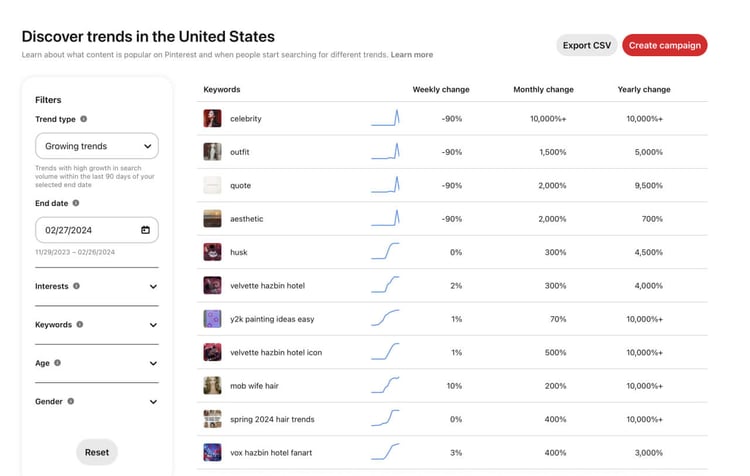
Pinterest Trends. trends.pinterest.com shows up to two years of top search, save and shopping trends by region, and lets you compare terms (Pinterest help). Use it to see whether a topic is growing, flat or seasonal, and when it peaks.
The search bar. Type a broad term and look at the autocomplete suggestions and the refinement bubbles that appear after you search. These are the phrases people actually use.

Seasonal timing. Pinterest says seasonal searches "start building momentum months before the season arrives" and gives this rule: "If the moment peaks in June, launch in April" (Pinterest 2026 Marketing Moments Guide). If you publish holiday Pins in December, you've missed most of the planning window. More on this in our seasonal Pins guide.
Gaps in your niche. Search your main keyword and look at the top results. Say you're in interior design and every top Pin for "green living room" uses the same sage-and-wood look. A Pin that answers the same search with a different style can stand out instead of blending in.
Our free Pinterest keyword research tool pulls keyword ideas for a topic, and the keyword research chapter of our growth guide explains how to build a keyword list per page.
2. Write titles and descriptions for search
Pinterest's own advice is to add keywords to Pin titles, Pin descriptions and board titles and descriptions, and to make the Pin's image, text and keywords match the landing page (source).
Useful limits from Pinterest's creative specs: titles can be up to 100 characters, but "the first 40 are most likely to show", and descriptions can run up to 800 characters (Pinterest creative best practices). Put the main keyword early in the title.
Don't overdo it. Pinterest's Community Guidelines list "stuffing" irrelevant keywords as spam (Community Guidelines). Write a sentence a person would read, using the words they'd search.
On hashtags: Pinterest's current distribution tips mention keywords, titles, descriptions and topic tags. They don't mention hashtags, so don't expect them to do much.
Related: how to write Pin titles that get clicks, our free title and description generator, and the board name generator.
3. Make fresh, sharp Pins that fit the feed
Pinterest recommends publishing your own Pins with fresh content rather than saving other people's Pins, using high-quality images or video, and avoiding duplicates (source).
Format guidance straight from Pinterest:
- Vertical 2:3, or 1000 x 1500 pixels. Larger ratios "may get cut off in people's feeds" (creative best practices).
- Video between 15 and 60 seconds (pin performance help).
- Layout: visual in the middle, key message as text overlay at the top, extra details at the bottom (creative best practices).

Beyond that, your niche sets the style. Search your main keyword, look at the top 10 Pins, and note what they share: real photos or illustrations, fonts, how much text, colors. Use that as a starting point and make your version clearer than the others.
The Pin should show what the person gets when they click. A Pin that says "5 easy weeknight dinners" should lead to a page with five easy weeknight dinners.
Canva is the tool most pinners start with because of its template library. You can also try our free Pin maker.
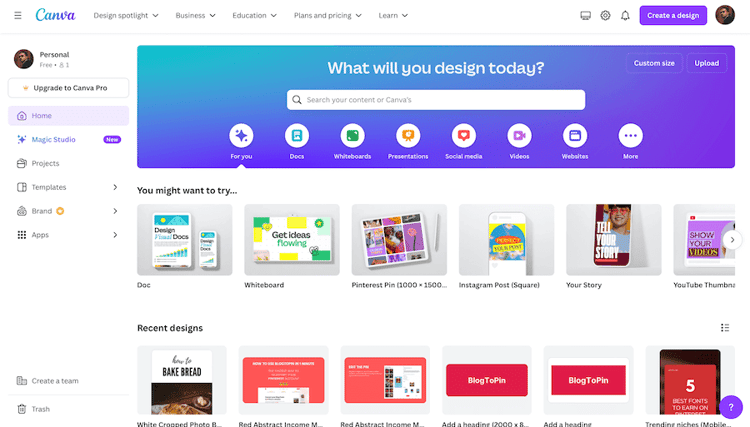
If you already have Canva templates, you can import them into BlogToPin (our product).
4. Post steadily, not in bursts
Pinterest's guidance is to "create Pins frequently and consistently", aim for original content every week, and you can schedule Pins up to two weeks ahead with Pinterest's own scheduler (source).
Pinterest doesn't publish a recommended number of Pins per day. Daily targets you see online come from tool vendors and consultants, not from Pinterest. Our own approach is to start low on a new account and increase slowly. The growth guide covers this in warmup and creating Pins and ramping up.
Spread Pins for the same page over time instead of publishing ten designs for one URL in an hour. That's both better for testing and safer, as the next section explains.
5. Make the click worth it
A Pin that gets clicks but leads to a weak page won't do much for you. Pinterest's troubleshooting list for falling distribution includes (source):
- Links that work and point to clearly related content
- Pin images, text and keywords that match the landing page
- Page load time under 4 seconds
- Not blocking Pinterestbot on your site or host
The Community Guidelines also ask that linked sites have "original content that adds unique value for Pinners", and ban deceptive redirects and "redirecting existing Pins to new destinations" (Community Guidelines).
On your side: deliver the promise near the top of the page, use good images in the post too, and link to related posts so a Pinterest visitor has somewhere to go next.
What gets accounts flagged
This is the part most "go viral" guides skip. Aggressive tactics can get you blocked.
Rate limit blocks. Pinterest may automatically and temporarily block an account that repeats the same action too often in a short time. Listed triggers include commenting very quickly, posting the same comment many times, following many people quickly, and "add or save a lot of Pins from the same website quickly". Most limits lift within 24 hours (Pinterest help).
Duplicates. Pinterest warns that repeatedly saving the same Pins or uploading content that already exists can get you "flagged as spam" (source).
Spam rules. The Community Guidelines prohibit repetitive, deceptive or irrelevant content made to earn money, automation that "hasn't been explicitly approved by Pinterest", creating accounts en masse, coordinating accounts to manipulate the platform, and buying or selling engagement (Community Guidelines).
Suspension. Accounts can be suspended for single or repeat guideline violations, spam included, and you can appeal (Pinterest help). Enforcement is real: Pinterest's 2025 EU Digital Services Act risk report says it deactivated over 1 million accounts for spam between July and December 2024 (report, PDF).
Our avoid bans chapter goes through the patterns we've seen trigger problems and how to recover.
Old advice to drop
- Saving the same Pin to many boards over and over. Pinterest specifically says not to repeatedly save the same Pins. Make a new design instead.
- Chasing hashtags. See above. Keywords in titles and descriptions do the work.
- "Rich Pins are dead." They aren't. Pinterest still supports article, product and recipe Rich Pins that sync details from your site (Pinterest help). If you run a blog or store, set them up.
- Advice written years ago. Pinterest's features and rules change. When a tip contradicts Pinterest's help center, trust the help center.
How to tell if it's working
Give Pins time. Then check Pinterest Analytics, which separates saves, Pin clicks and outbound clicks. Outbound clicks are the ones that send people to your site, and they're counted from the date a link is added (Pinterest Analytics help). Pinterest's own advice is to make more of what your analytics show people engage with (source).
When one Pin takes off, make new Pins for the same page with different designs and angles, and look for related keywords you could write new content for.
Where BlogToPin fits
BlogToPin is our product, so weigh this accordingly. It creates Pins from your website's sitemap or RSS feed (or from images you upload), writes AI titles and descriptions, schedules Pins against your keywords, warms up new accounts, and can delete underperforming Pins. Publishing goes through Pinterest's official API.
Pricing starts at $39/month, or $25/month billed annually, for the Starter plan. There's no free trial, but you can generate and preview Pins before paying. Fully automatic daily Pin creation for newly published pages is on the Enterprise plan.
It saves design and scheduling time. It won't fix a niche nobody searches for or a page that doesn't deliver on the Pin.
Checklist
- Confirm people search for your topic (Trends, search bar).
- Publish seasonal content well before the peak.
- Put the main keyword early in the title, and write descriptions for people.
- Use vertical 2:3 Pins with a clear text overlay.
- Publish fresh Pins every week, spread out over time.
- Make sure the landing page matches the Pin and loads fast.
- Don't repeat the same actions, duplicate Pins or stuff keywords.
- Watch outbound clicks, then make more of what works.


