


Short answer: hashtags are optional on Pinterest and do very little. You can add a few specific ones at the end of a description and nothing bad happens, but your time is better spent on the Pin title, the description, topic tags and the board you save to. That's where Pinterest's own guidance points.
What Pinterest says about hashtags now
In September 2017 Pinterest added hashtag feeds: a hashtag in a description let people visit a feed of Pins with the same tag, with "the freshest Pins" at the top (Pinterest Newsroom, 2017). A lot of the hashtag advice still floating around dates from that period.
Pinterest's current help pages barely mention them:
- The create a Pin guide mentions hashtags once, in the app instructions: "Write a description of your Pin (you can also include hashtags)." The desktop instructions don't mention them at all.
- The Pin performance and distribution article, which is Pinterest's advice on getting Pins seen, doesn't mention hashtags. It says to include relevant keywords in your "Pin title, Pin descriptions, board titles, board descriptions and website URL" and to "add topic tags during the publishing process."
- Pinterest's guide to building an audience talks about titles, descriptions, keywords and topic tags. No hashtags.
None of these pages recommends a number of hashtags. Claims like "use exactly 2 to 5" or "20 hashtags get more reach" aren't based on anything Pinterest has published.
Keywords, topic tags and hashtags compared
| Keywords | Topic tags | Hashtags | |
|---|---|---|---|
| Where | Pin title, description, board name and description, URL | Picked from Pinterest's list when you publish (up to 10) | Typed into the description |
| What Pinterest says | Include relevant keywords in all of these | Helps "people searching for similar ideas find your Pin" | "You can also include hashtags" |
| Worth your time? | Yes, this is the main lever | Yes, takes 30 seconds | Optional |
Sources: Pin performance and distribution, Create a Pin.
The Pin title deserves the most attention. Pinterest allows 100 characters, and depending on the device only the first 40 may show in feeds (ad specs). Our guide on writing Pin titles that convert covers formulas and examples.
When a few hashtags still make sense
- Seasonal and event content: #halloweendecor, #backtoschoollunches, #thanksgivingsides. These match how people search at that time of year.
- Your own brand or campaign tag, if you use it everywhere (Instagram, TikTok, packaging) and want it on Pinterest too.
- A specific phrase that matches a real search, like #sourdoughdiscard rather than #baking.
For an evergreen how-to or a product Pin, it's fine to use none.
How to add them, if you do
- Write the description first as two or three normal sentences with your main keyword and a couple of related phrases.
- Add zero to five specific hashtags at the end. Put them after the sentences so the part people read comes first.
- Use the phrase people search for, not a mood. #smallbedroomideas, not #goals.
- Make them match the Pin. A hashtag that doesn't describe the Pin can't help it.
Before and after
A description written for Instagram:
Obsessed with this one 😍 #food #foodie #yummy #instafood #delicious #dinner #vegan #veganfood #healthy #easyrecipes #recipeoftheday #homecooking #foodblogger #lasagna #italian
The same Pin, written for Pinterest:
This easy vegan lasagna uses a cashew ricotta and a lentil tomato sauce, and it's ready in about 45 minutes. It's a make-ahead dinner that feeds a crowd and reheats well, so it works for meal prep too. Get the full recipe with step-by-step photos. #veganlasagna #makeaheaddinner
The second version gives Pinterest the phrases it actually matches against searches ("easy vegan lasagna", "make-ahead dinner", "meal prep") in sentences. The two hashtags are a bonus. Delete them and the description still does its job.
More examples
| Pin | Description ends with | Why |
|---|---|---|
| Halloween charcuterie board | #halloweenpartyfood #halloweencharcuterie | Seasonal search, two specific tags |
| Small balcony makeover | #smallbalconyideas | One tag that repeats the search phrase |
| Handmade silver stacking rings (Etsy) | #stackingrings #sterlingsilverring | Product types buyers look for |
| Blog post: how to start a podcast | No hashtags | Evergreen how-to; the title "How to Start a Podcast" does the work |
| Brand launch Pin | #yourbrandname | Brand tag you use on every platform |
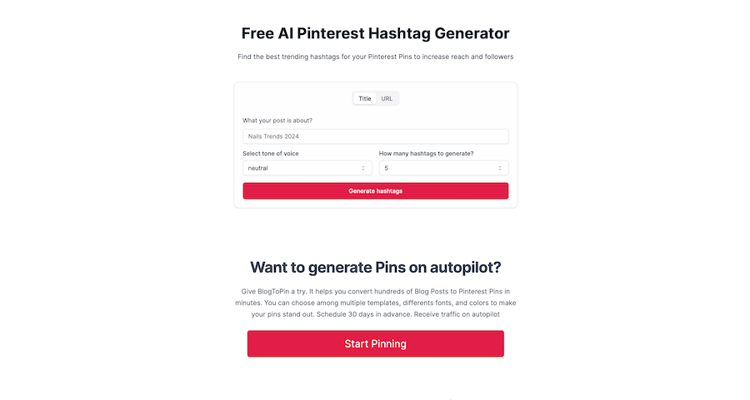
The free Pinterest hashtag generator gives you a list from a topic or URL. Generate a long list, then keep only the most specific few.
Common mistakes
- Pasting an Instagram hashtag block. It makes the description hard to read and adds nothing your keywords don't already say.
- Broad tags like #love, #inspo, #instagood or #food. They describe millions of unrelated Pins.
- Hashtags instead of a description. A description made only of tags gives Pinterest less to work with than two plain sentences.
- Hashtags in board names. Name boards with plain words people search, like "Easy No-Bake Dinners" (Pinterest's example). More in our board names guide.
- Skipping topic tags while agonizing over hashtags. Topic tags are the feature Pinterest actually recommends.
Finding the right words
The same research works for keywords and the occasional hashtag:
- Type your topic into Pinterest search and note the suggestions.

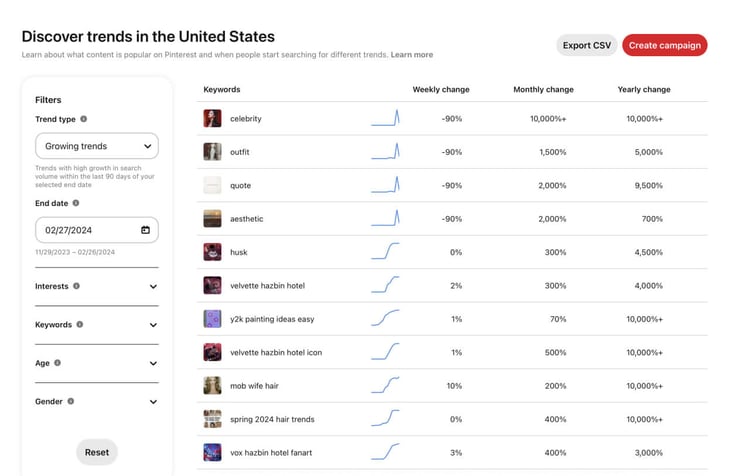
- Check Pinterest Trends for seasonal timing. It shows top search terms and whether a trend is seasonal (Pinterest help).
- Use the free Pinterest keyword research tool, and see the keyword research chapter of our growth guide for how to organize what you find.
Can you measure whether hashtags help?
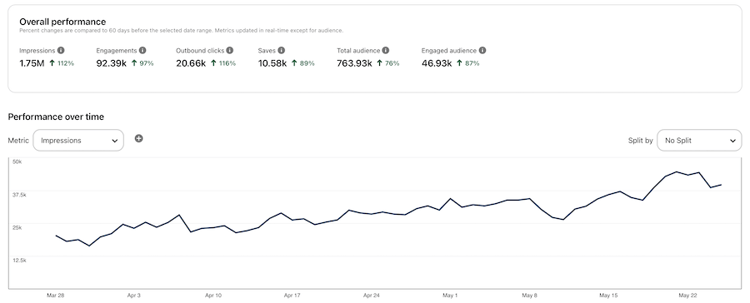
Not cleanly. Pinterest Analytics reports impressions ("the number of times your Pins or ads were on screen"), saves and outbound clicks per Pin (Pinterest Analytics), but it doesn't break traffic down by hashtag. If you want to test it, publish similar Pins with and without hashtags over a few weeks and compare impressions. Expect the difference to be small next to the effect of a better title or board.
Tools
- Free Pinterest hashtag generator for a quick list of specific tags.
- Free Pinterest title and description generator for the parts that matter more.
- BlogToPin if you want Pins created from your sitemap, RSS feed or uploads, with AI titles, descriptions and designs, matched to boards and scheduled by keyword. Starter is $39/month ($25/month billed annually); no free trial, but you can preview Pins before paying. Disclosure: BlogToPin is our product.


